


10. Pathfinder (A*)

While Unity has its own pathfinder system (NavMesh), coding my "own" solution is a good challenge to understand how pathfinding works without just relying on a built-in system.
The chosen pathfinding method is A*, which uses Euclidean distance to measure the straight-line distance between two points in a continuous space, taking into account the x, y, and z coordinate (3D node grid).

To do this, the most convenient solution was to use Editor scripts, so the Node grid could be baked before the game starts, saving some loading screen time.
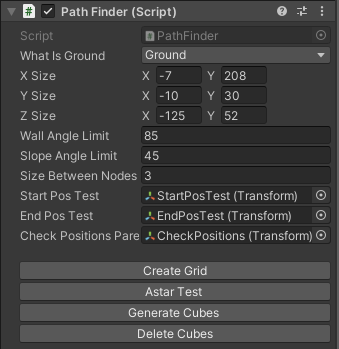
The first option is to select the layers for the layer mask to determine what kind of objects are considered walkable.
The second part is to set the world size where the nodes are going to be spawned.
If the node is too close to the wall, it's not considered walkable. To determine what counts as a wall, the "Wall Angle Limit" variable has to be changed.
The slope angle limit is the slope angle under the node. If it's too steep, it's not considered walkable.
The size between nodes is spacing, which mostly helps with optimization (too many nodes take up too much memory and result in longer pathfinding).
Buttons:
Create Grid: Bakes the nodes and saves them.
A* Test: Line renderer shows the visual result for the pathfinding between 2 points.
Generate Cubes: Instantiates cubes on the position of the node (for debugging purposes).
Delete Cubes: Deletes the said cubes.


The gird algorithm still only covers the basics and needs some additional work to optimize it in case the world is grow bigger, might using a chunk-based system could help to store all the nodes.
Thanks for reading!
-Bence (Oliminor)


Comments